

Frequently asked questions
Below are answers to common questions about organizations, account management, and resource sharing. If you don’t find an answer to your question here, contact our support team at support@twelvelabs.io for further assistance.
How is a personal account different from an organization account?
A personal account is your individual account that only you can access. Resources (such as indexes, videos, and S3 integrations) created in your personal account are private to you.
An organization account is a shared workspace where multiple team members can collaborate. Resources created within an organization account are automatically shared with all organization members. Organization accounts also provide additional features like SSO authentication, centralized billing, and usage monitoring.
What happens to my personal account when I create an organization?
When you create an organization, a new organization account is established. Your personal account remains separate. Both accounts are associated with your email address. Your personal account and organization account each have distinct API keys.
Can I create multiple organizations?
The platform allows you to create one organization per account.
What plan do new organizations start on?
New organizations are created on the Free plan by default. For details on the rate limits for each plan, see the Rate limits page. To upgrade, follow the steps in the Upgrade your organization’s plan section.
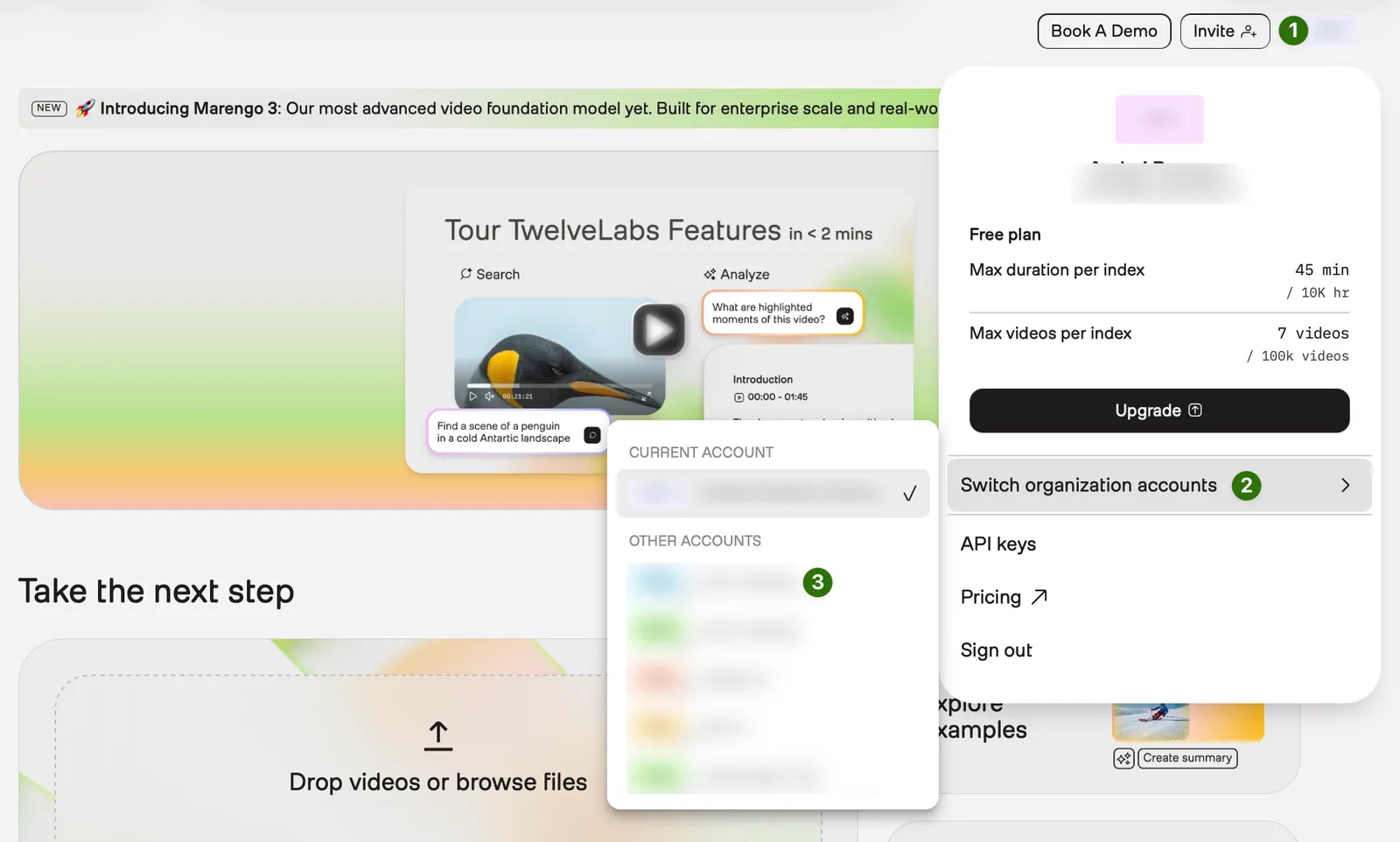
How do I switch between a personal account and an organization account?
Your current account is displayed in the top-right corner of the screen. Personal accounts are marked with your initials, while organization accounts will show the initials of the respective organization.
To switch between your accounts:
From any page of the Playground, select your profile icon in the top-right corner.
Can I view my personal indexes in an organization account?
Indexes created in your personal account remain private and cannot be accessed through your organization account. Similarly, organization indexes cannot be accessed through your personal account. You’ll need to switch between accounts to access different sets of resources.
What happens when a user is removed from an organization?
When a user is removed from an organization, the platform revokes their API key for the organization, and they will no longer have access to the organization’s resources.
Will the S3 integrations be shared with other team members?
Yes. All S3 integrations created within an organization account are automatically shared with all members of that organization. This enables teams to collaborate using shared storage resources.
How can I view the billing and usage for my organization?
See the Manage your organization section for details on how you can view your billing and usage. Note that organization billing is only accessible to administrators.
Is billing consolidated for organization accounts?
Yes. When you use an organization account, you receive a single consolidated bill for all team members instead of separate bills for each user.
Can I create private indexes within an organization account?
Currently, we are working on this capability.
Which rate limits apply to organization accounts?
When using an organization account, rate limits apply in aggregate to all users in the organization. For details on the rate limits for each plan, see the Rate limits page.